Select All
Selects all the files and folders in the active folder window.
Default shortcut key: CTRL+A
Select None
De-selects all the files and folders in the active folder window.
Note: It is possible to let a single click with the left mouse button on an empty area in the folder window equal a Select None operation. You'll find this option on the Selection page in the User Interface preferences.
Default shortcut key: CTRL+N
Invert Selection
Inverts the selection in the active folder window. All files that are selected becomes deselected and visa versa.
Default shortcut key: CTRL+I
Select Pattern
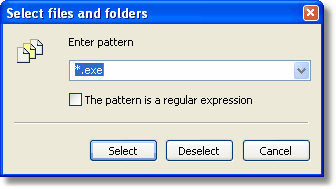
The Select Pattern dialog
Displays this dialog box asking for a wild card or regular expression pattern. Clicking Select will select all files in the active folder window that match the pattern. Similarly, if Deselect is clicked then the files matching the pattern will have their selection removed.
Note: Files and folders that was selected/unselected prior to this operation will keep their state if they were not affected by the pattern.
If you want to select only the files affected by the pattern and have all other files unselected you need to explicitly unselect all files prior to invoking this tool, either using the Select None tool or by mouse or keyboard selection. The same applies in the reverse case where you want all files selected except the ones that match the filter. You would then first select all the files and then use the Select Pattern tool.
Shortcut key: CTRL+S
Related topics
|
|
| Step by Step Guide: Adding tools to the toolbar
|
| Step by Step Guide: Adding tools to the Quick/Navigation bar
|
| Step by Step Guide: Adding or modifying a keyboard shortcut
|