General
The general tab of the Print Folder dialog is shown below.
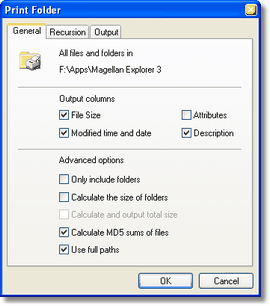
The Print Folder General tab
The General tab lets you customize most aspects of what to print and what to ignore.
Output columns
You can select which columns you want to include in the output. Please note that file names will always be included.
Advanced options
|
If you choose this option Magellan Explorer will output only folder names, not the files contained in them
| |||
|
This options causes Magellan Explorer to output the size of all files within a folder next to that folder in the output
| |||
|
The size of all output files and folders are included at the end of the output
| |||
|
This option will cause Magellan Explorer to generate a 16 byte (128 bit) MD5 checksum for each file
| |||
|
Each file is output with its full path. Otherwise just the file name is used.
|
Recursion
The second tab lets you configure the recursion of sub folders. A cutout of the results tab is shown below.
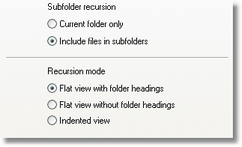
A section of the Recursion tab
You can specify whether folder recursion should be performed or not. If recursion is enabled then the contents of all folders are processed, and in turn their folders etc.
If you enable recursion you have the choice of three output formats. They determine how the output is presented and the best way to familiarize yourself with them is to simply print some folders and see for yourself.
Output
The output tab is the last step to printing a folder, and is shown below.
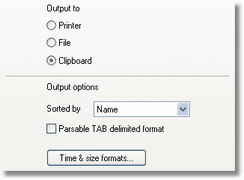
A section of the Output tab
This tab lets you specify where to send the output.
|
After pressing Ok the standard Windows printer dialog will appear where you can select which printer to use and other settings.
| |||
|
You can have the output written to a file instead of the printer. A dialog will appear after you have pressed Ok to request the filename.
| |||
|
If you would like to paste the output into another application you can choose to print the files and folders to the Windows Clipboard. To retrieve it select Paste in the application where you want it.
|
You can also choose how the output is to be sorted and also whether to use a parsable TAB delimited format instead of a human readable format. This is useful to e.g. import the list of printed folders into other applications.
You can further customize the output of time and sizes by clicking the Time & Size formats button. This will present the following dialog.
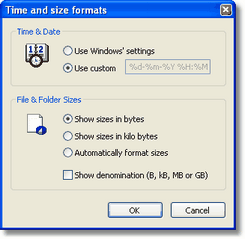
The Time and size formats dialog
This dialog lets you chose to use a custom date format, see the Advanced page in the Folder Windows preferences section for an explanation of how to customize a date format and the General page for an explanation on the file size display.
Related topics
|
|
| Step by Step Guide: Adding tools to the toolbar
|
| Step by Step Guide: Adding tools to the Quick/Navigation bar
|
| Step by Step Guide: Adding or modifying a keyboard shortcut
|